Loading page


Build, test, publish, and run workflows from your terminal and your CI.
kovca is Kovca's command-line client. On its own it opens a full-screen terminal Studio where you see a workflow as a graph, edit it, test and run it with live step progress, publish it, and run its automation. Its commands script the same things for CI, and kovca workflows export and apply let you keep workflows in your repository. It uses the same drafts, validation, publishing, and runs as the web Studio, the Workflows API, and the MCP server, so everything it does shows up in the Studio, and runs are billed like any other.
On macOS and Linux (Intel and ARM), with Homebrew:
brew tap kovca/tap https://storage.googleapis.com/kovca-cli/homebrew-tap.git
brew install kovca/tap/kovca
Or with the install script, which downloads the latest release, checks its SHA-256 checksum, and puts kovca in ~/.local/bin:
curl -fsSL https://kovca.io/install.sh | shOn Windows, in PowerShell. The script installs to %LOCALAPPDATA%\kovca\bin and adds that folder to your user PATH:
irm https://kovca.io/install.ps1 | iexOr with Scoop:
scoop install https://storage.googleapis.com/kovca-cli/kovca.jsonBoth scripts install a specific version when KOVCA_VERSION is set (for example KOVCA_VERSION=0.2.0), and into another folder when KOVCA_INSTALL_DIR is set. With access to the Kovca source, you can also build it with Go 1.24 or newer: go build -o kovca ./cmd/kovca in cli/. Check the install with kovca version.
The full-screen Studio needs a terminal with Unicode and true color, such as Windows Terminal. NO_COLOR turns colors off, and output that isn't a terminal gets plain text without colors or tables.
kovca loginkovca login shows an 8-letter code and opens Sign in to the Kovca CLI in your browser (use --no-browser to open the link yourself). Check that the code matches your terminal, pick the workspace and the access level, and approve. The terminal then receives its own workspace API key and keeps it in your system's keychain. The key is listed on the API keys page with a CLI badge, where you can revoke it.
A CLI key stops working after 90 days without use; run kovca login again. kovca whoami shows the workspace, access level, and key, and kovca logout revokes the key and removes it from your machine. --profile NAME keeps separate sign-ins, for example for several workspaces.
Run kovca (or kovca studio [workflow]) in a terminal. Everywhere, : or ctrl+p opens the command palette, ? lists every key, and ctrl+c quits.
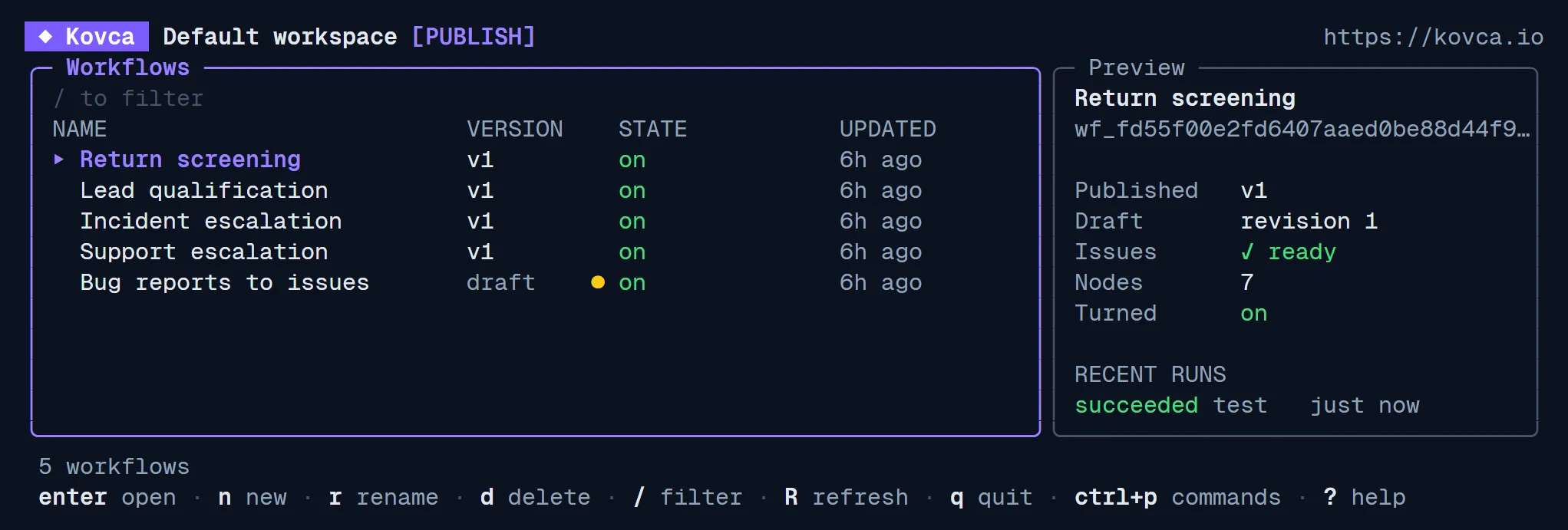
Your workflows with their published version, unpublished changes, and on/off or automation state, and a preview with recent runs. enter opens one, / filters, n creates one (blank, from a template, or around a Decision AI node), r renames, and d archives.
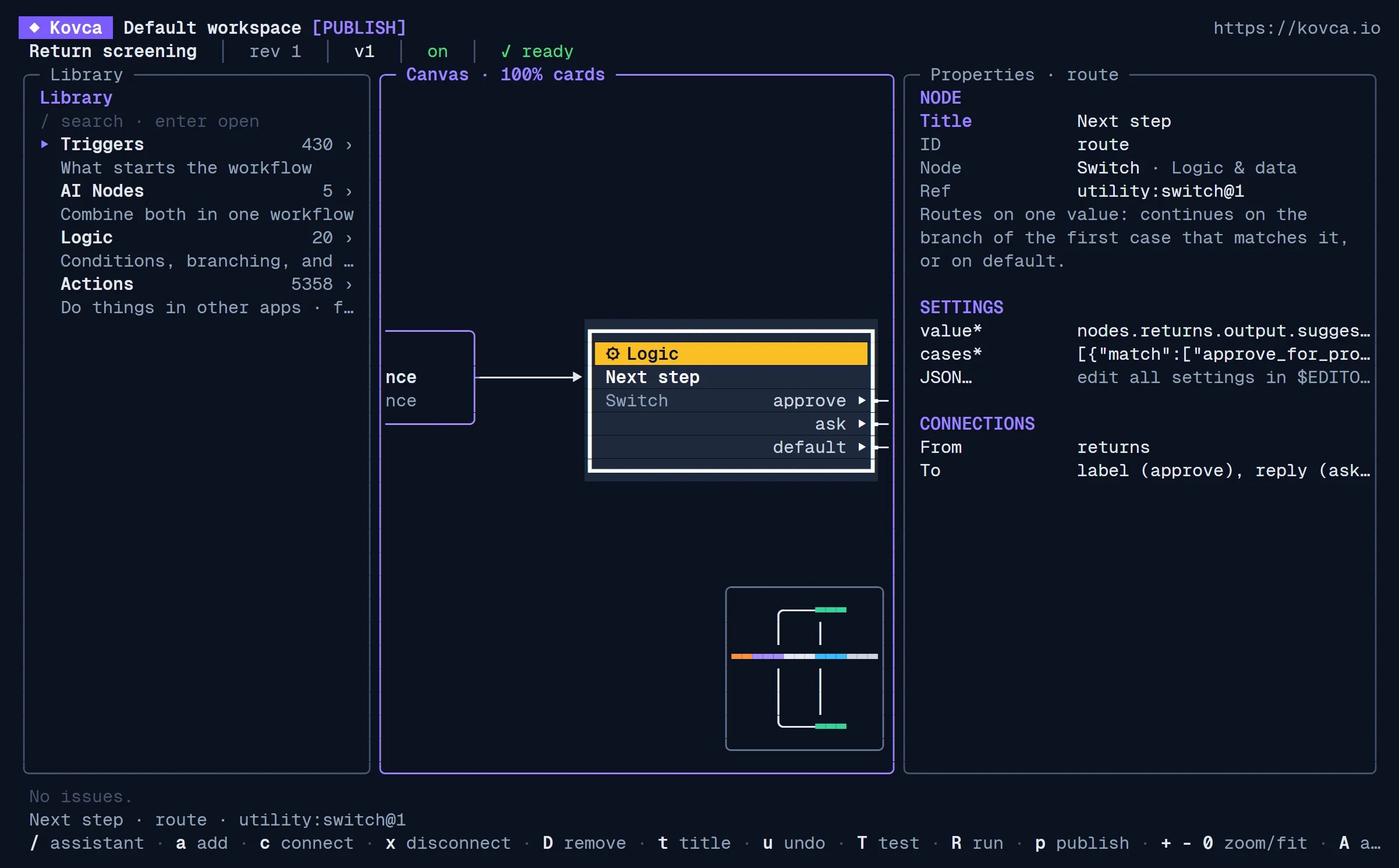
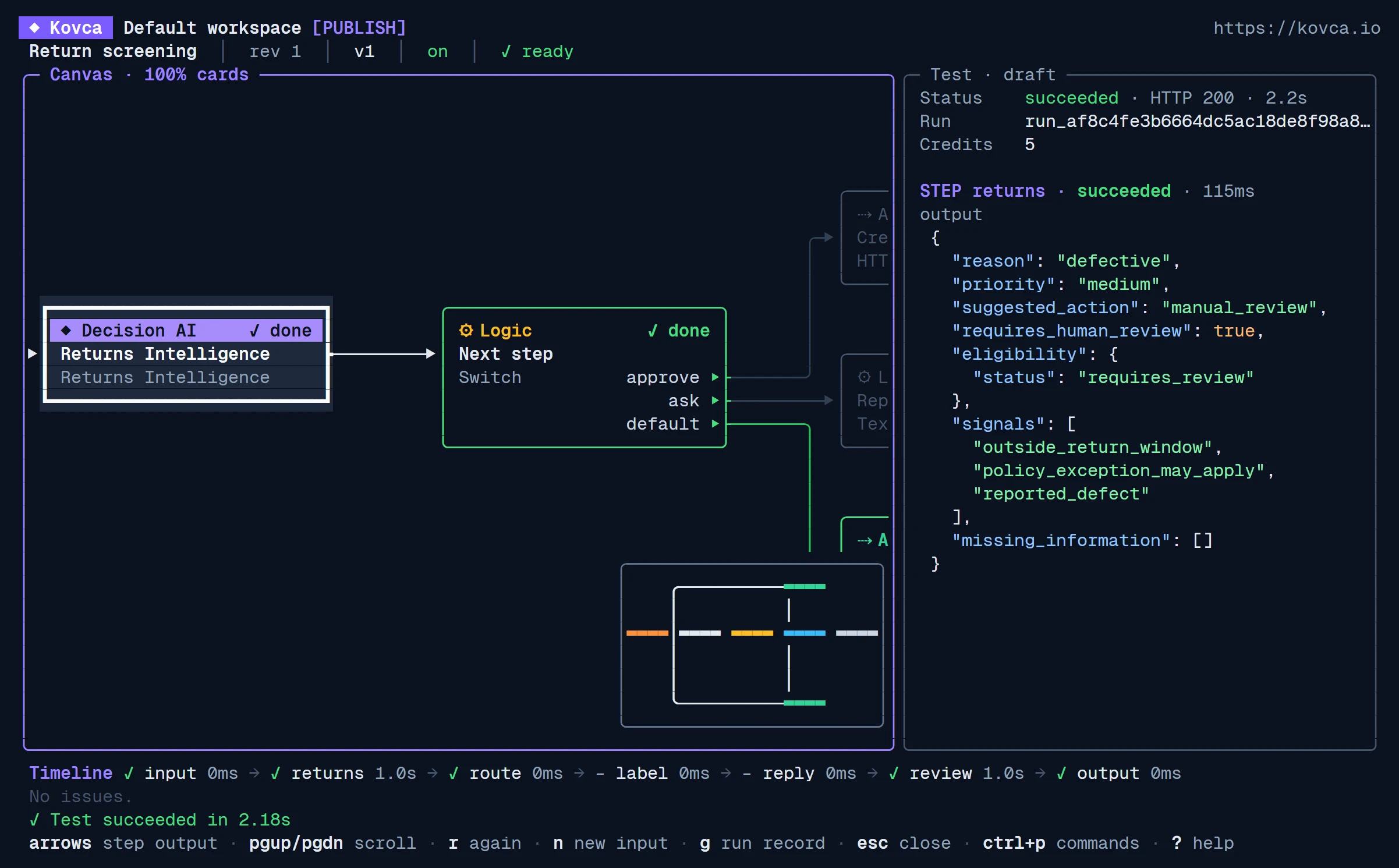
The node library on the left, the graph in the middle, and the selected node's properties on the right, with the workflow's issues below. Arrows or hjkl select nodes, + and - zoom, 0 fits the graph, a adds a node, c connects, x disconnects, D removes, u undoes, T tests the draft, R runs the published version, p publishes, and A opens the automation. [ and ] hide or show the side panes.
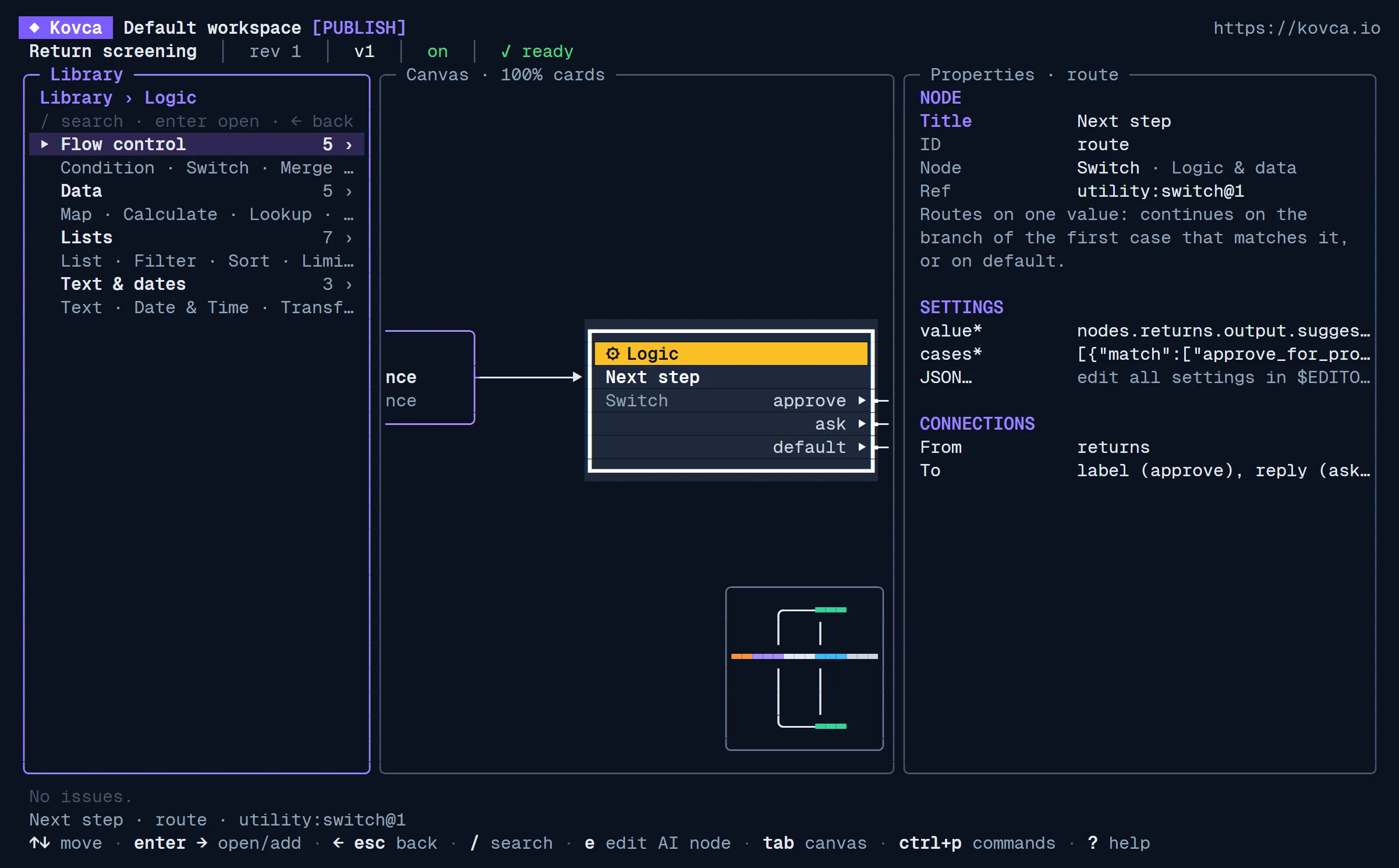
The same nodes and triggers as the web Studio's library, grouped into pages, with search across every page. enter adds a node or sets the trigger. You can also create, test, and publish your workspace's own Decision AI and Generative AI nodes here.
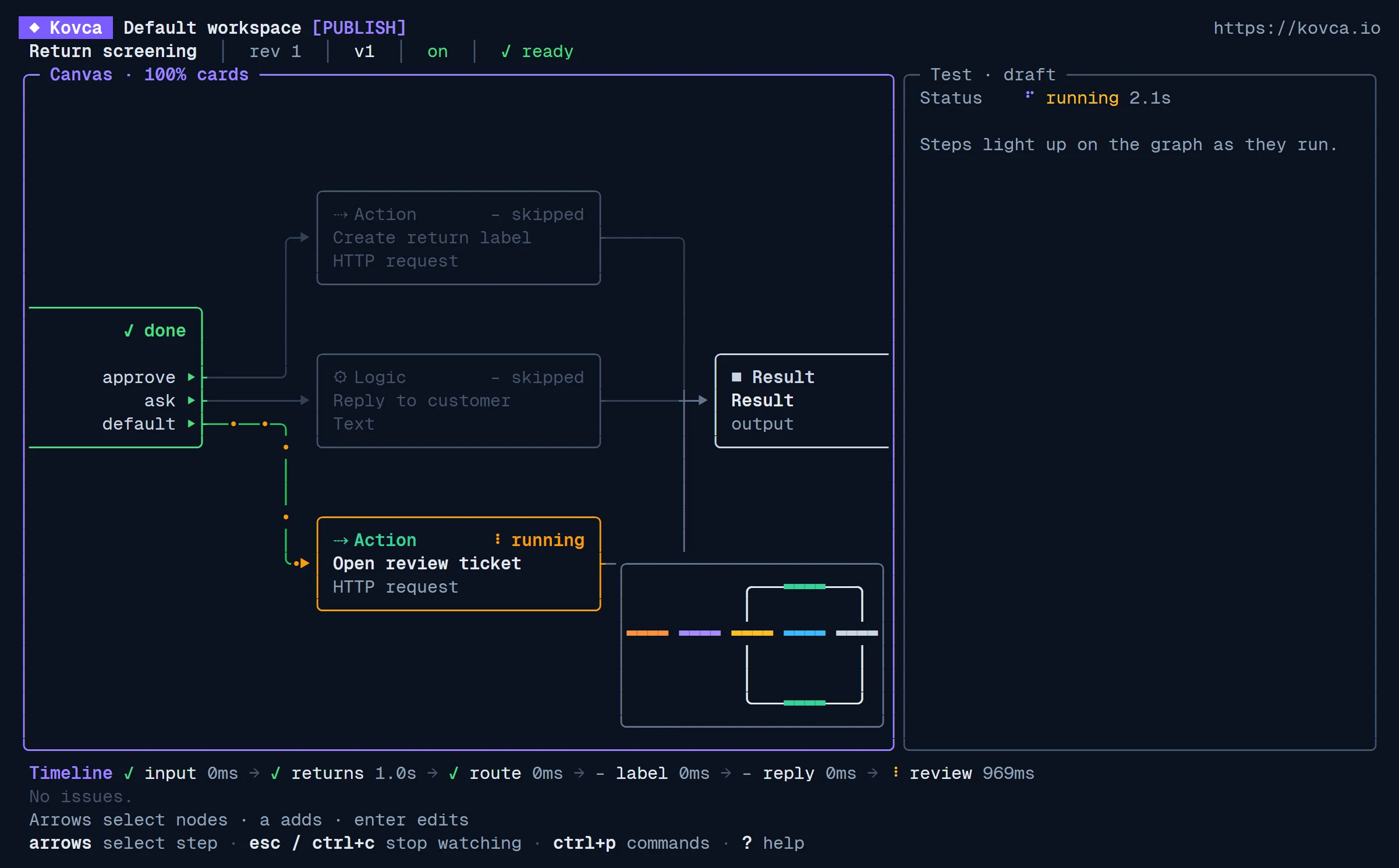
Steps light up on the graph as they run, and the canvas follows the running step, with a timeline below. When it finishes you see the output. A test also shows each step's output (select a node), and a failed step shows its error. Tests use the samples of HTTP and app actions unless you turn on real requests.
/ asks the web Studio's assistant to explain or change the workflow (Author access).
Every change is saved to the draft right away, like in the web Studio. The terminal's graph layout is only for display and never moves nodes on the web canvas.
In scripts and CI, set KOVCA_API_KEY to a workspace API key instead of signing in, and KOVCA_ORIGIN if you don't use https://kovca.io. Name workflows by ID or by exact name (an ambiguous name is an error). Commands that print data accept --json. Progress goes to stderr and data to stdout, so you can pipe the output.
kovca workflows ls, kovca workflows get <wf>, kovca workflows templateskovca run <wf> [--input file|-] [--input-json '{…}'] [--version N] [--idempotency-key K]: runs the published version, with live step lines on stderr and the output JSON on stdout (--json prints the whole result).kovca test <wf> [input flags] [--version N] [--live-actions]: tests the draft. Actions return their samples unless --live-actions is set.kovca validate <wf>: issues and publishing blockers.kovca publish <wf> [--pin-nodes] [--activate]: validates and publishes. --pin-nodes first publishes the draft workspace nodes the workflow uses and pins them; --activate then starts its automation on the new version, or moves it there.kovca automation status|activate [--version N]|pause|resume|deactivate <wf>, kovca workflows enable|disable <wf>kovca workflows create <name> [--template ID | --node REF], kovca workflows rename <wf> <name>, kovca workflows rm <wf> [--yes] (archives; asks you to type the name in a terminal, and needs --yes otherwise)kovca nodes ls, kovca nodes get <node>, kovca nodes test <node> [input flags], kovca nodes publish <node>: your workspace's own AI nodes, by ID or nameecho '{"message": "My invoice is wrong"}' | kovca run "Support triage" --input - > output.json
kovca test "Support triage" --input-json '{"message": "hi"}' --json | jq .status
kovca publish "Support triage" --activateExit codes tell scripts what happened:
| Code | Meaning |
|---|---|
| 0 | Success. |
| 1 | Failed: a run or test that didn't succeed, or a server error. |
| 2 | Usage error: an unknown command or flag, or a missing argument. |
| 3 | Not signed in, or the key was rejected (401). Run kovca login or check KOVCA_API_KEY. |
| 4 | The key's access level is too low for this command (403). |
| 5 | Not publishable: validation found blockers. |
| 6 | Revision conflict: the draft changed while the command ran. |
This GitHub Actions workflow applies the workflow files in kovca/ on every push to main, then validates and publishes each one. Store a Publish key as the KOVCA_API_KEY repository secret.
name: Kovca workflows

on:
  push:
    branches: [main]
    paths: ["kovca/**"]

jobs:
  publish:
    runs-on: ubuntu-latest
    env:
      KOVCA_API_KEY: ${{ secrets.KOVCA_API_KEY }}  # a Publish key from the API keys page
    steps:
      - uses: actions/checkout@v5
      - name: Install kovca
        run: |
          curl -fsSL https://kovca.io/install.sh | sh
          echo "$HOME/.local/bin" >> "$GITHUB_PATH"
      - name: Apply, validate, and publish
        run: |
          for file in kovca/*.json; do
            id="$(jq -r .id "$file")"
            kovca workflows apply "$file"
            kovca validate "$id"
            kovca publish "$id"
donekovca workflows export <wf> [-o file] writes a workflow's draft to a file you can review and keep in version control:
{
  "kovca": "workflow",
  "format": 1,
  "id": "wf_…",
  "name": "Support triage",
  "definition": { … }
}
The definition holds the workflow's nodes and connections; the canvas layout and examples stay in the Studio. kovca workflows apply <file> [--workflow <wf>] [--create] [--publish] replaces the draft of --workflow, or else of the file's id. With --create, or when the file has no id, it creates a workflow first. It renames the workflow when the name differs, prints what changed and the remaining issues, and with --publish publishes it.
Workspace AI nodes (refs like custom:node_… or ai:node_…) exist only in their own workspace. Applying a file that uses them to another workspace reports them as issues: create those nodes there and update the refs.
At most once a day, kovca checks in the background whether a newer version exists, and after the command prints one line on stderr with the install command (or that your version is no longer supported). It never delays a command, and it doesn't check in CI (when CI is set), when stderr isn't a terminal, or with KOVCA_NO_UPDATE_CHECK=1. The Studio header shows when an update is available. Update the way you installed: brew upgrade kovca, scoop update kovca, or the install script again.
When kovca crashes or hits an error it doesn't expect (a bug, or a response it can't read), it sends a crash report so we can fix it. A report has the kovca version, your operating system and processor type, the command without its arguments (for example kovca run), and the error with its stack trace. Before sending, kovca removes API keys, email addresses, URL query strings, quoted text such as workflow names, and your home folder from it. Reports never include your workflows, inputs, outputs, keys, account, or computer's name. Expected outcomes aren't reported: usage mistakes, sign-in and access errors, publish blockers, conflicts, failed runs, network problems, and errors the server returns (the server logs those itself).
Set KOVCA_NO_TELEMETRY=1 (or DO_NOT_TRACK=1) to turn crash reports off. kovca mentions them once, the first time it runs in a terminal. Builds from source never send reports.