

Turn customer bug reports from Gmail into clean developer issues
Build a Kovca workflow that starts from new Gmail mail, classifies it, extracts the bug report fields the email states, and replies, opens an issue, or labels the message.
Bug reports land in a shared Gmail inbox next to feature requests, how-to questions, and the occasional second report of something you already filed. A lot of them never say how to reproduce the problem. Someone copies the useful ones into the tracker by hand, and the rest wait.
This guide builds a workflow that starts when a new message arrives, classifies it, pulls out the report fields the email actually states, and then takes one next step: reply asking for what's missing, open an issue in your tracker, or add a label for another queue. You'll start from a template, test it, and activate it on the inbox.
The template already uses the Gmail New email trigger, Reply, and Add label. It does not store a Gmail account. You choose the account when you activate. Until then the draft saves, and Studio tests simulate the Gmail steps.
If the inbox only gets a handful of reports a week, a Gmail filter and a short checklist in the tracker is less machinery than this. The workflow is for the inbox where copying reports across is already a routine.
What you'll build
 Gmail new email, Support Triage, then a switch into Add label or Extract report, Reply, and Open issue.
| Step | Node | What it does |
|---|---|---|
| Input | Gmail: New email (gmail/new_email) | Starts the workflow. The event fields are from, body_text, received_at, labels, message_id, thread_id, to, and subject. |
| Support Triage | Decision AI | Returns category, priority (low, medium, high), and requires_human_review. |
| Bug report? | Switch | bug when category is technical. Everything else is default. |
| Extract report | Generative AI | On the bug branch, pulls product_area, steps_to_reproduce, expected, and actual out of the email. Leaves a field out when the email doesn't state it. |
| Needs a person? | Condition | On the bug branch. true when requires_human_review is true. That path opens the issue even if details are missing. |
| Missing details? | Condition | true when steps, expected, or actual is absent. |
| Ask for details | Text | The reply asking for those three. |
| Reply | Gmail Reply (action:gmail/reply@1) | Sends that text on the thread. |
| Open issue | HTTP request | Posts a structured payload to your tracker. |
| Team note | Text | One line you can hand to Slack. |
| Queue label | Lookup | Maps any other category to a list of one label ID. |
| Add label | Gmail Add label (action:gmail/add_label@1) | Applies that list to the message. |
| Output | Output | Returns the classification, the extracted fields, and whichever branch ran. |
Support Triage does not return a bug / feature request / how-to label, and it does not return steps, expected, or actual. technical is its bucket for errors, bugs, outages, crashes, slow performance, and integration problems. product covers both how a feature works and a feature request. Those two stay in one queue unless you split them yourself later. priority is the severity this node returns.
Build it in the Studio
1Start from the template
Click Use this template above, or open Bug report issues in Workflows.
The draft opens on the canvas. The components library is on the left. Triggers, AI Nodes, Logic, and Actions are the four groups. Gmail is under Triggers and under Actions.
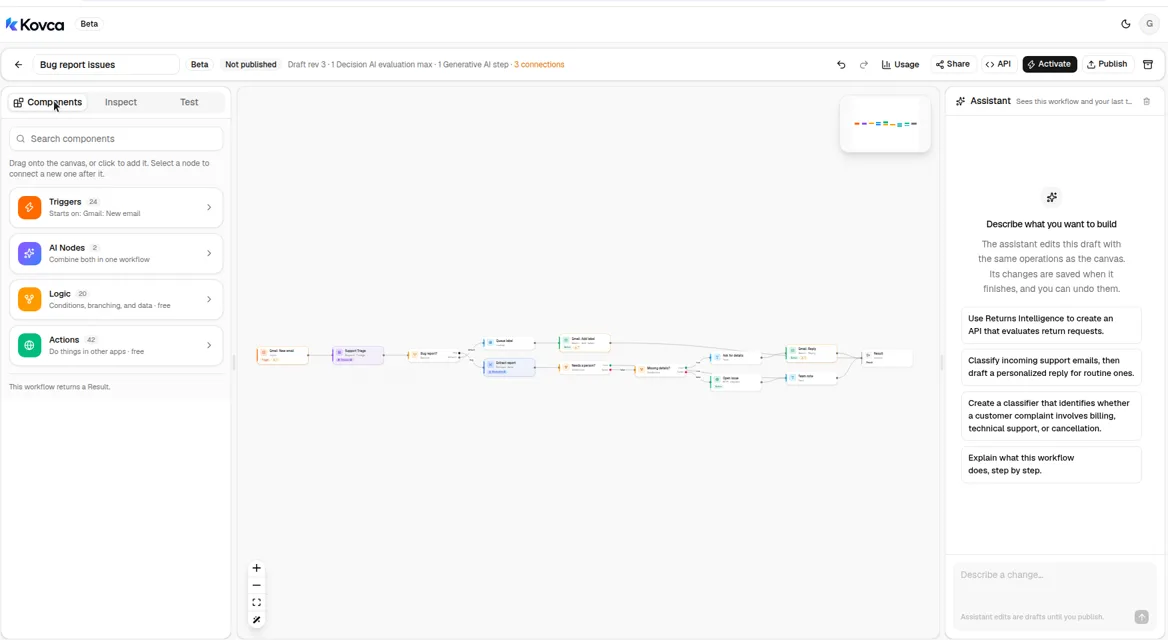 The library home. Gmail is inside Triggers and Actions.
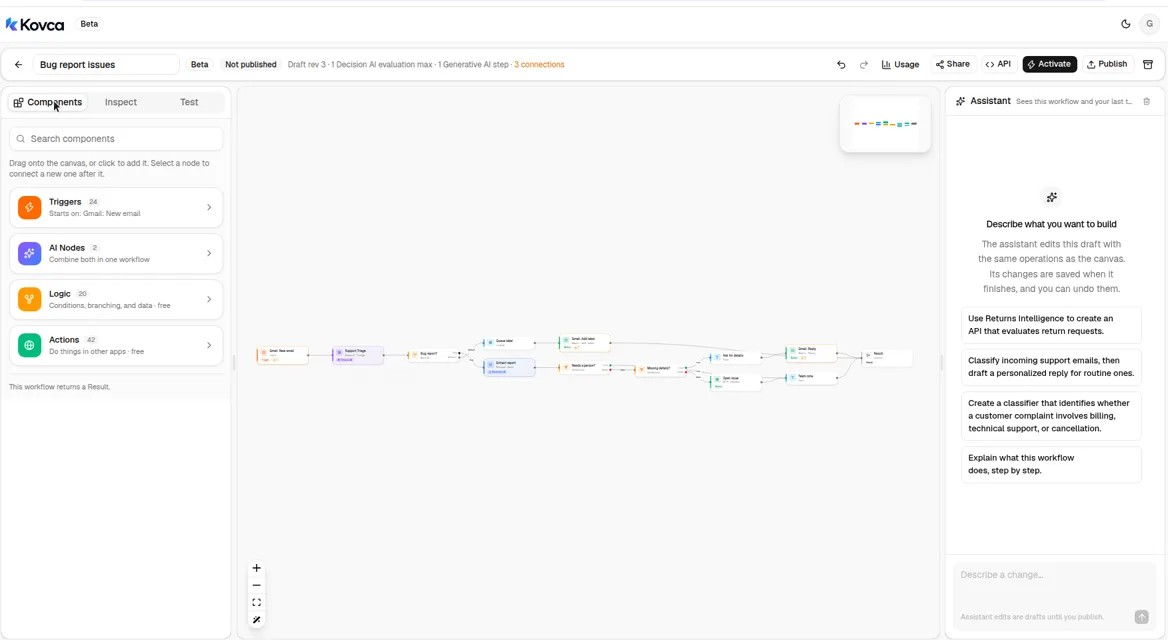 The draft is not callable until you publish and activate it.
2The workflow starts from new mail
Select the input step. It is Gmail · New email, not an API request. The account line is empty until you connect Gmail. Leave it empty while you test.
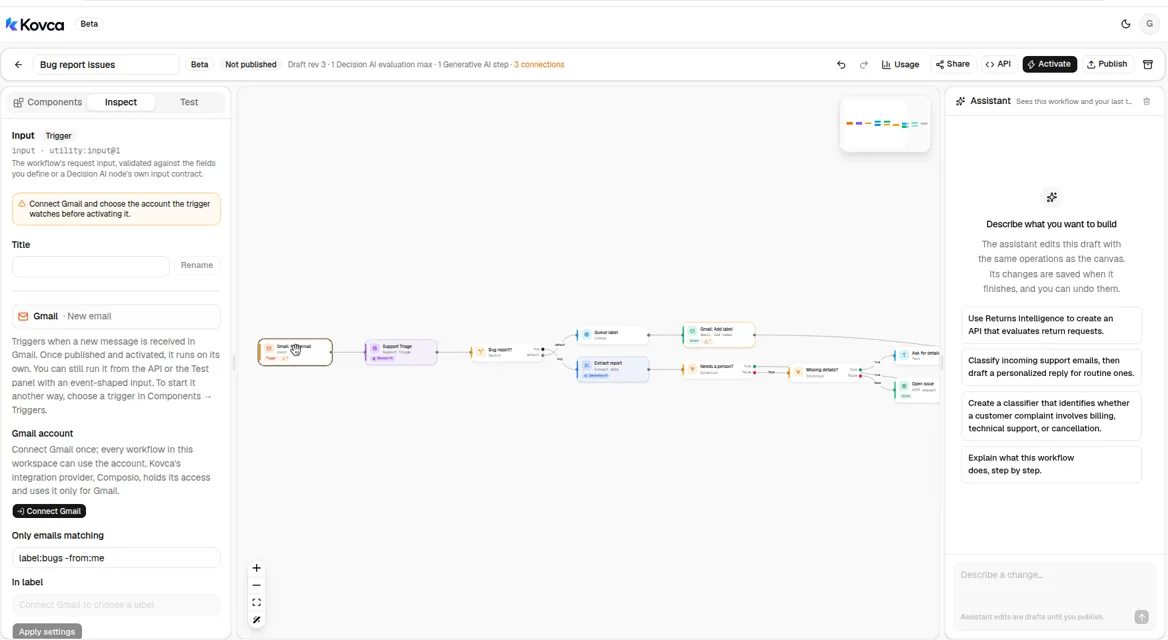 Only emails matching is set to label:bugs -from:me. No Gmail account is selected.
The template sets Only emails matching (query) to label:bugs -from:me. That uses the same syntax as Gmail's search box. Change it to the label you actually use, or clear it. In label (label_ids) is optional and takes one label ID. Once an account is connected, that field lists the mailbox's labels.
Event fields later steps read:
| Field | Used for |
|---|---|
input.subject | Support Triage, the issue title, and the reply |
input.body_text | Support Triage's message, and the issue body |
input.from | The issue payload, and Reply's To |
input.thread_id | Reply's Thread ID |
input.message_id | Add label's Message ID, and the issue payload |
The event also includes to, received_at, and labels. A manual run or an API call can omit them.
3Classify the email
Select Support Triage. subject and message are mapped from the event. message reads input.body_text.
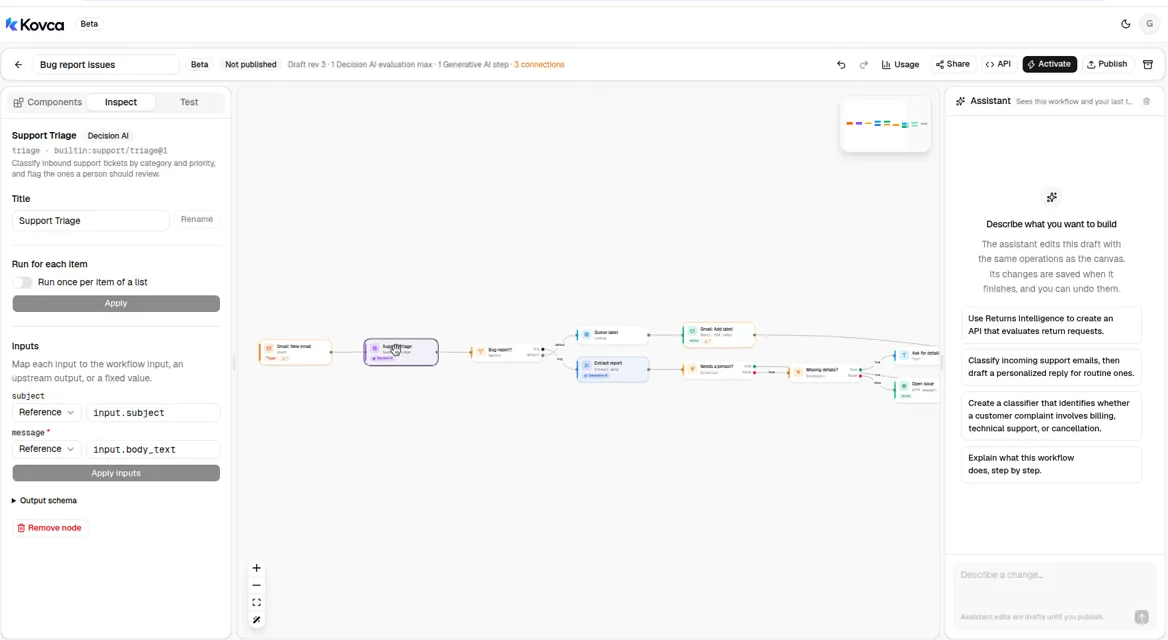 subject comes from input.subject. message comes from input.body_text.
The node decides on fixed, published rules:
categoryisbilling,technical,account,product, orother.productmeans a how-to or a feature request. It does not split those.priorityislowfor a question or feedback,mediumwhen the customer has a problem but can keep working, andhighwhen they're blocked right now. A message the node treats as a security problem ishigh.requires_human_reviewistruewhen a legal threat or a security problem is reasonably possible, or when the category or priority itself is unclear.
The node's subject field accepts at most 200 characters, and message is required and accepts at most 8,000. Because subject is mapped straight into this step, a subject longer than 200 characters is refused before the run starts. Keep subjects inside that limit, or stop mapping subject into this step and leave the full subject on the issue title only. An empty body fails this step.
4Read the report fields
Select Extract report. It sits on the bug branch, after the switch, so how-to and billing mail never reach it. It's the Extract data node: you write the instructions, and you name the fields.
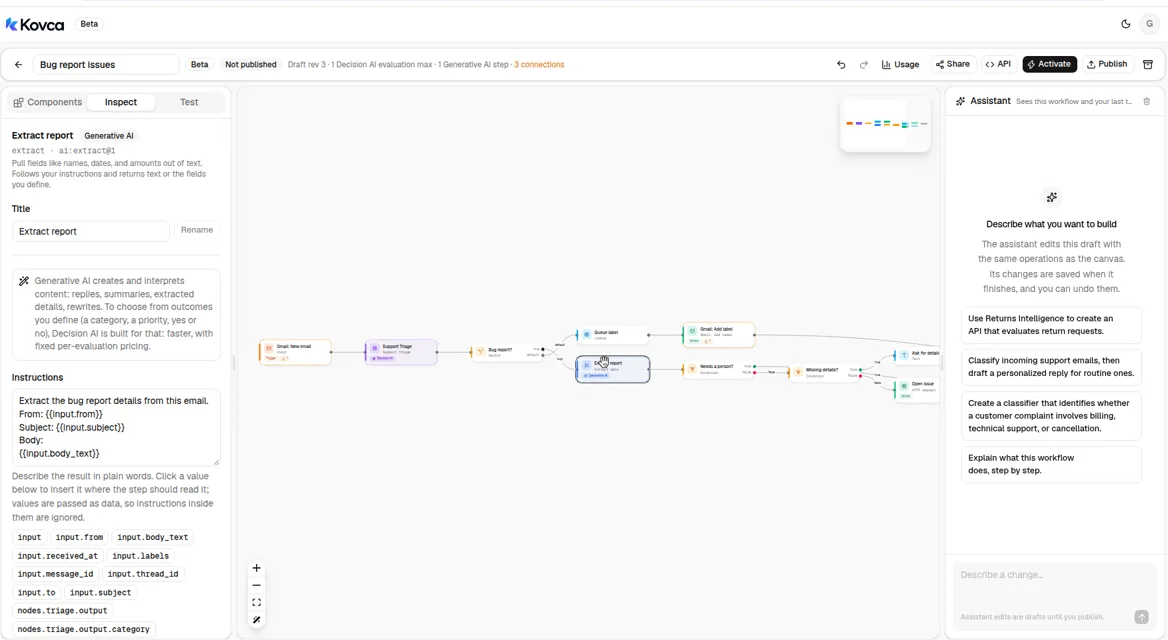 The instructions say to copy the customer's words and leave a field out when the email doesn't state it.
The fields are all optional on purpose. product_area, steps_to_reproduce, expected, and actual come back only when the email states them. A missing product area does not block the issue. A missing steps, expected, or actual field does, on the bug branch.
The instructions tell the step to copy the customer's words and not to fill in a likely value. An empty string still counts as present, so a field that comes back blank won't take the missing-details branch. If you see that, tighten the instructions so a blank field is left out.
5Route the message
Select Bug report?. The switch reads nodes.triage.output.category. The bug case matches technical. Every other category takes default, including product.
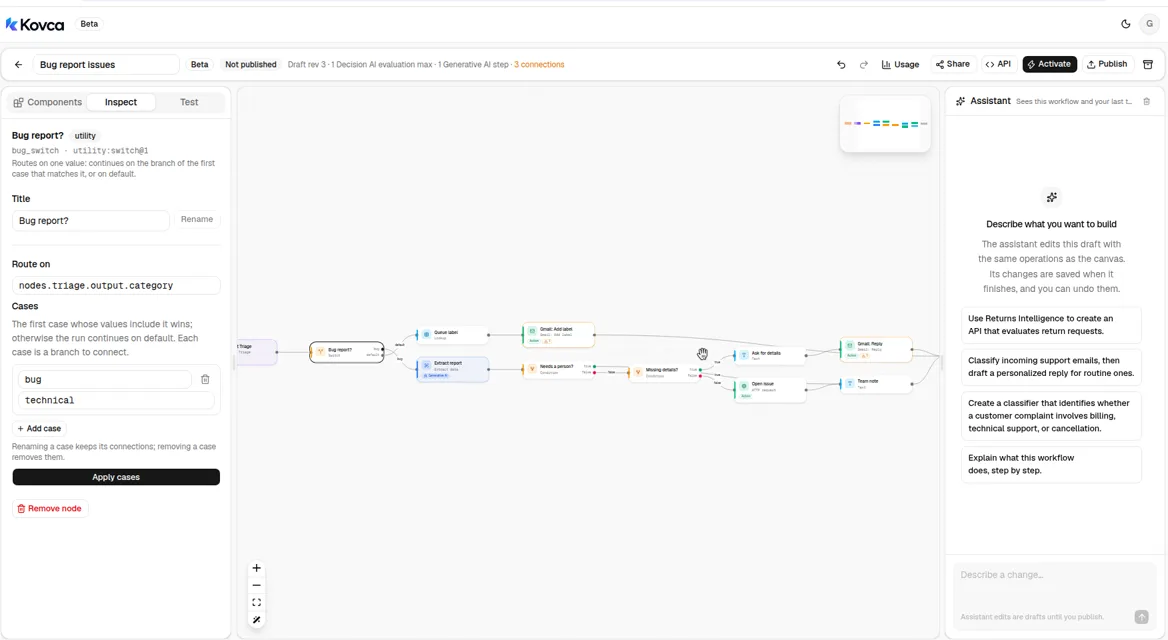 technical goes to Extract report. Every other category goes to Queue label.
On the bug branch, Needs a person? checks nodes.triage.output.requires_human_review. When that's true, the workflow opens the issue even if steps are missing, so a report the node wants a person to see is not answered with a request for reproduction steps.
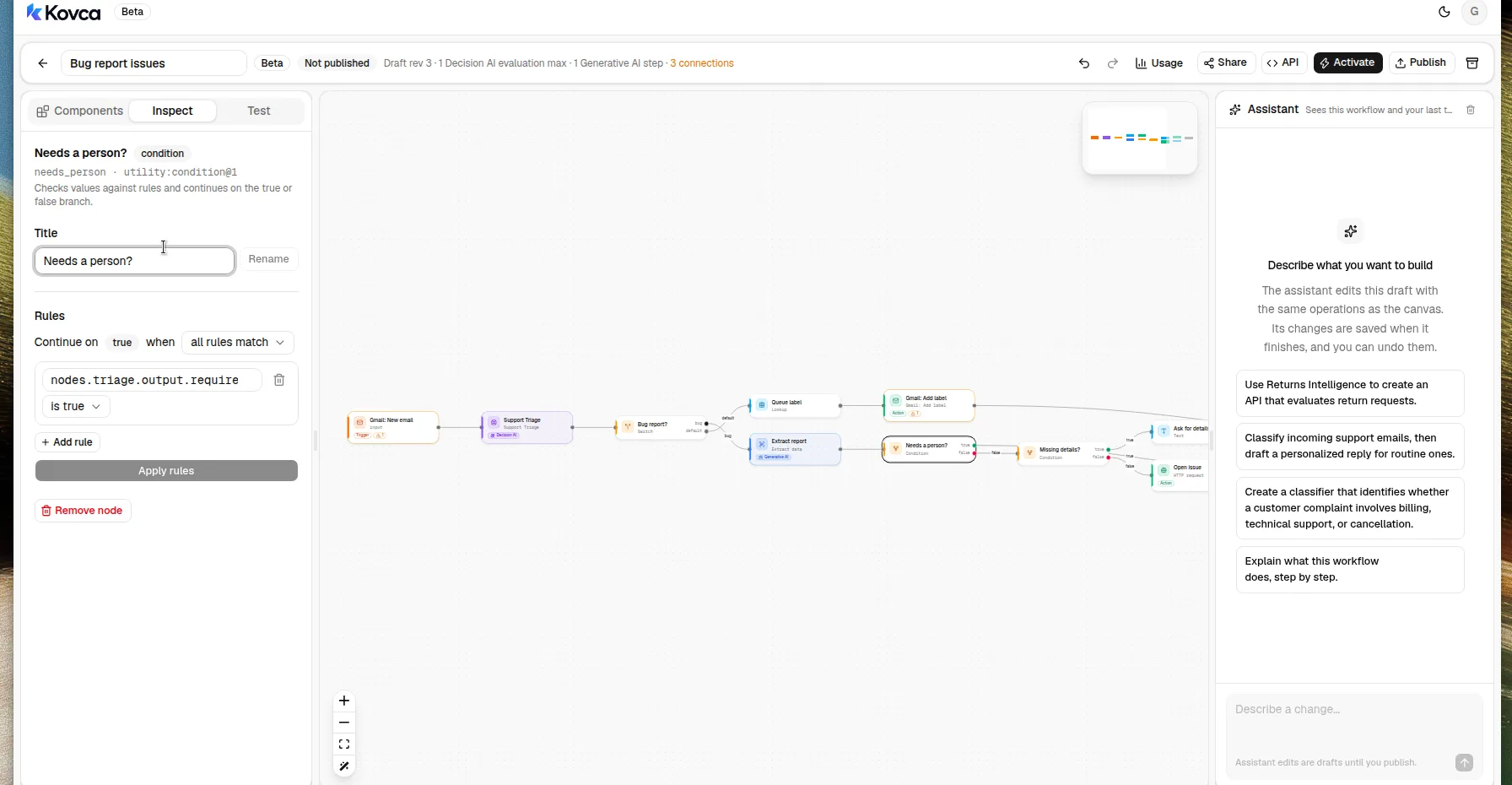 True opens the issue. False checks whether the report fields are present.
Missing details? is true when any of steps_to_reproduce, expected, or actual is absent. Every operator except is absent is false when a value is missing, which is why this one uses is absent.
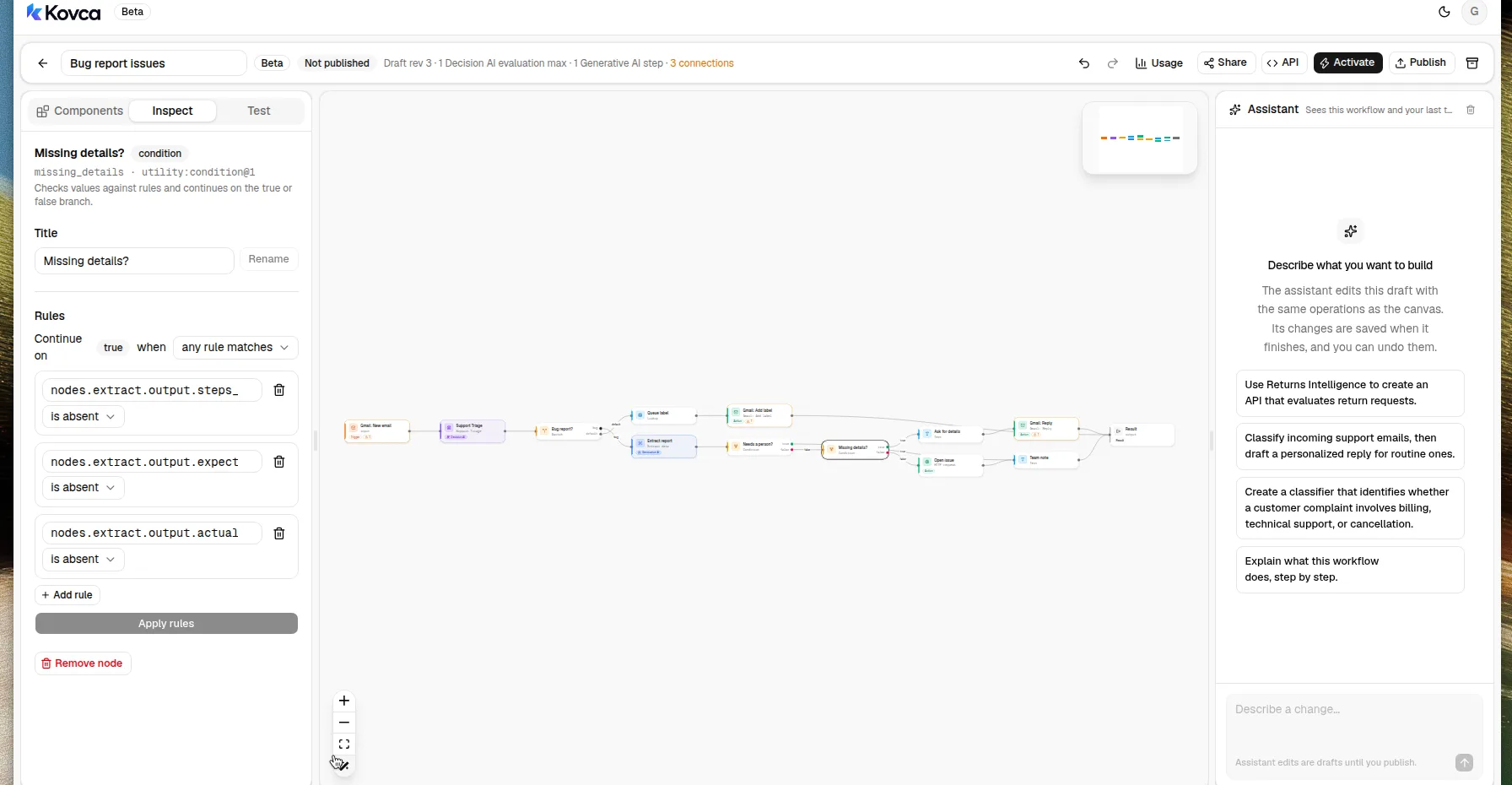 Any one of the three fields being absent goes to Reply. Otherwise the workflow opens the issue.
This workflow does not detect a duplicate of an issue you already have. The same Gmail message does not start two runs. A later email in the thread is a new message and runs again. message_id and thread_id go on the issue payload so your tracker can match a thread it already opened.
6Reply when the report is thin
Ask for details is the reply text for a technical message that's missing steps, expected, or actual.
Thanks for writing in about {{input.subject}}. To file this, we still need the steps you took, what you expected to happen, and what happened instead. Reply to this email with those three and we will send it to the team.Reply is Gmail's Reply action. It is already on the path from Ask for details to Output.
| Reply field | Value |
|---|---|
Thread ID (thread_id) | input.thread_id |
To (recipient_email) | input.from |
Reply text (message_body) | nodes.ask.output.text |
To asks for an address in the form user@domain.com. On this trigger, input.from is the sender string Gmail returns, and it can include a display name (Name <user@domain.com>). A value that isn't only the address can fail when the reply is sent for real. If that happens, map To to the address. Reply is sent once: Kovca does not retry it on its own. Choose the Gmail account on this step before you activate. Studio tests simulate it and do not send mail.
7Open the issue
Select Open issue. The body fields are the JSON object your tracker receives: the email, the triage result, and the extracted fields.
Point it at your tracker:
- Choose a Connection, or create one from the inspector. A connection holds the base URL and credentials (a bearer token, an API key header, basic auth, or a secret URL). With a connection, the URL becomes a path such as
/api/issues. - Change the Body fields to the names your tracker expects. The template sends
title,body,from,message_id,thread_id,category,priority,requires_human_review,product_area,steps_to_reproduce,expected, andactual. - Paste a real response into Sample response. Studio tests return it instead of calling the API, and Team note reads
body.id. The template's sample is{ "id": "ISSUE-1042", "url": "https://tracker.example.com/issues/ISSUE-1042" }with status 201. - Leave On error at fail. If the issue can't be created, the run fails and you find out.
Every request carries an Idempotency-Key that stays the same across retries of that step in that run. POST requests are only retried when you turn that on for the step.
Team note builds one line from the issue id, the subject, and the priority.
{{nodes.issue.output.body.id}}: {{input.subject}} ({{nodes.triage.output.priority}})Slack is not in the template, so activating does not ask you to connect Slack. To also post that line, select Team note and add Send message under Actions → Slack (action:slack/send_message@1). Connect it onward to Output if you want it on the path into the result. Map Channel (channel, required) to a channel ID or name, and Message (markdown_text) to nodes.note.output.text. Choose the Slack account on the step. Skip this if the tracker is the only place the team looks.
8Label everything that isn't a bug report
Queue label maps the category to a one-item list of label IDs. A list, because Add label takes label IDs as a list, not a single string.
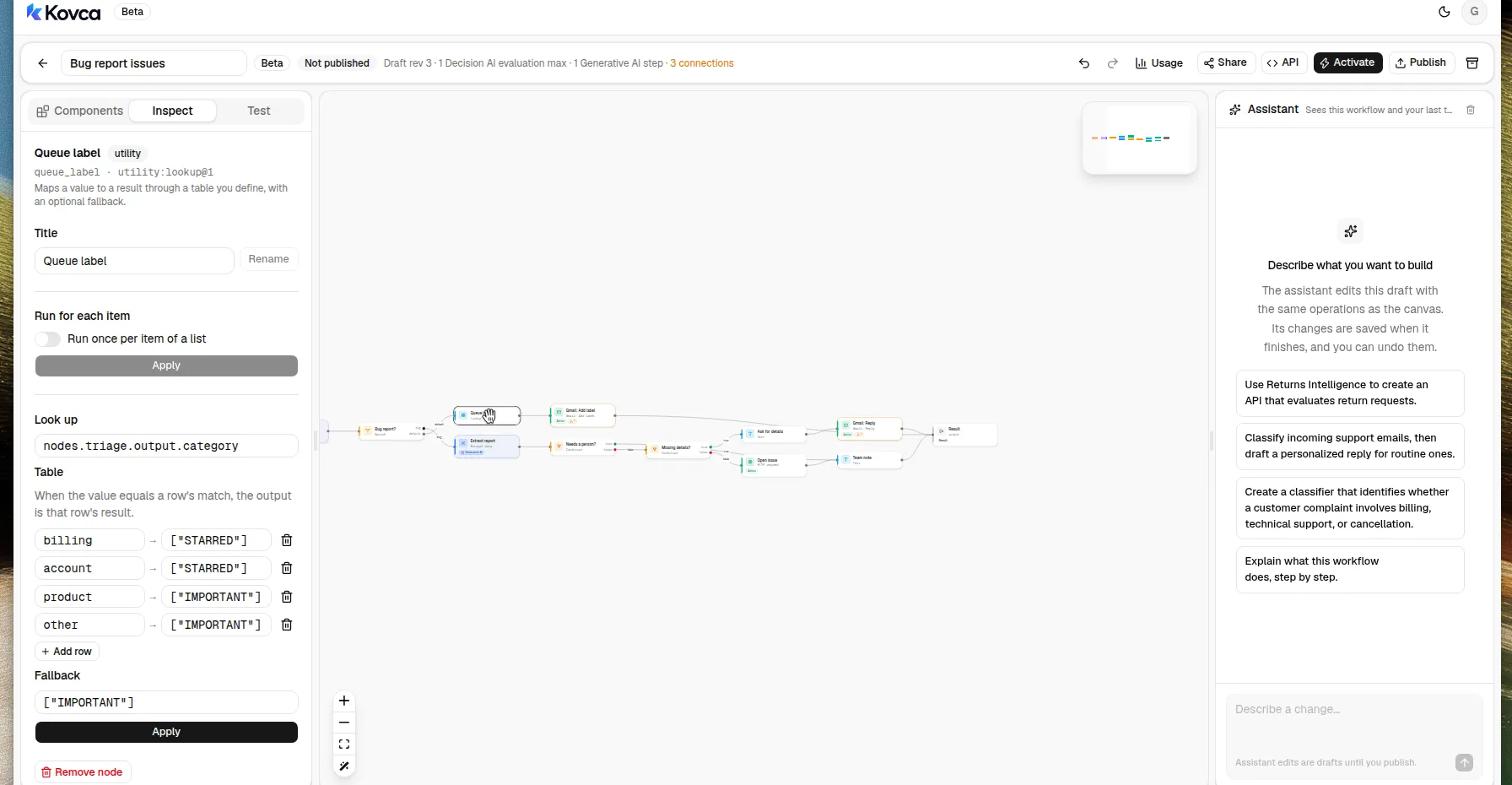 billing and account map to STARRED. product and other map to IMPORTANT.
| Category | Label IDs |
|---|---|
billing, account | ["STARRED"] |
product, other, and the fallback | ["IMPORTANT"] |
STARRED and IMPORTANT are real Gmail system label IDs, so the step is valid before you connect an account. They are stand-ins. Replace each one with the label ID for that queue. Add label and Remove label take IDs, not display names. A custom label has an ID Gmail assigned. Once the account is connected, the trigger's In label list shows each label's name and ID. product is still both feature requests and how-to questions, so they share one label until you add your own split.
Add label is already connected from Queue label to Output.
| Add label field | Value |
|---|---|
Message ID (message_id) | input.message_id |
Label IDs (add_label_ids) | nodes.queue.output.result |
The lookup result is already a list, which is what that field expects. A plain string will not validate. Add label is safe to retry. Choose the same Gmail account.
9Test it
Open the Test tab. The template's examples are listed above the input. Leave Send real requests off: the HTTP step returns its sample response, and Gmail Reply and Add label return their samples. Nothing is sent.
Run Broken export when you want a message that includes steps, expected, and actual, and How-to question when you want a shorter one. What Support Triage returns depends on the message. A technical result with all three report fields takes Open issue. A technical result missing one of them takes Reply, unless Needs a person? is true, in which case it still opens the issue. Any other category takes Add label. Steps that aren't on the path are skipped.
Before you activate, run a stack of real messages from the inbox, including a few that were filed late and a few that should have stayed in Gmail. When the routes look right, turn on Send real requests once, with the tracker connection in place, to check that call. Leave Gmail simulated until the routes look right.
Publish, call it, and activate it
The same workflow can be called over the API. The body uses the trigger's field names. Create an API key under API keys and keep it on your backend.
curl https://kovca.io/api/v1/workflows/wf_.../execute \
  -H "Authorization: Bearer $KOVCA_API_KEY" \
  -H "Content-Type: application/json" \
  -H "Idempotency-Key: 18f0a1b2c3d4e501" \
  -d '{
    "input": {
      "from": "reporter@example.com",
      "to": "bugs@example.com",
      "subject": "Export fails on the invoices page",
      "body_text": "On the invoices page I click Export and nothing downloads. I expected a CSV file. Steps: open Invoices, click Export. Expected: a CSV file downloads. Actual: the button spins and then stops.",
      "message_id": "18f0a1b2c3d4e501",
      "thread_id": "18f0a1b2c3d4e501",
      "received_at": "2026-11-02T14:03:00Z",
      "labels": ["INBOX", "UNREAD"]
    }
  }'
A run that classifies that message as technical, fills in the three report fields, and does not flag it for a person, takes the issue path. Extract report's wording follows the email. The fields below are that shape, with the template's sample issue id. Reply and Add label are skipped, so their inputs are not sent.
{
  "request_id": "req_...",
  "run_id": "run_...",
  "workflow": { "id": "wf_...", "version": 1 },
  "status": "succeeded",
  "output": {
    "category": "technical",
    "priority": "high",
    "requires_human_review": false,
    "route": "bug",
    "needs_person": false,
    "missing_details": false,
    "product_area": "invoices",
    "steps_to_reproduce": "Open Invoices and click Export.",
    "expected": "A CSV file downloads.",
    "actual": "The button spins and then stops.",
    "issue_id": "ISSUE-1042",
    "team_note": "ISSUE-1042: Export fails on the invoices page (high)",
    "reply": null,
    "queue": null
  },
  "steps": [
    { "id": "input", "status": "succeeded" },
    { "id": "triage", "status": "succeeded" },
    { "id": "extract", "status": "succeeded" },
    { "id": "route", "status": "succeeded" },
    { "id": "person", "status": "succeeded" },
    { "id": "details", "status": "succeeded" },
    { "id": "ask", "status": "skipped", "reason": "branch_not_taken" },
    { "id": "reply", "status": "skipped", "reason": "branch_not_taken" },
    { "id": "issue", "status": "succeeded", "http_status": 201 },
    { "id": "note", "status": "succeeded" },
    { "id": "queue", "status": "skipped", "reason": "branch_not_taken" },
    { "id": "label", "status": "skipped", "reason": "branch_not_taken" },
    { "id": "output", "status": "succeeded" }
  ],
  "evaluations": 1
}
Use the message id as the Idempotency-Key. A retry returns the original run instead of opening a second issue. Kovca does not store the email or the output, so keep the response from the first call. Values from steps that didn't run come back as null.
To run it from the inbox, open Activate. The checklist is what's left: connect Gmail, choose that account on the trigger, on Reply, and on Add label, replace the placeholder label IDs, and point Open issue at your tracker. Publish & activate publishes the draft and starts it. A live automation runs that pinned version. Later edits don't reach it until you choose Publish & update.
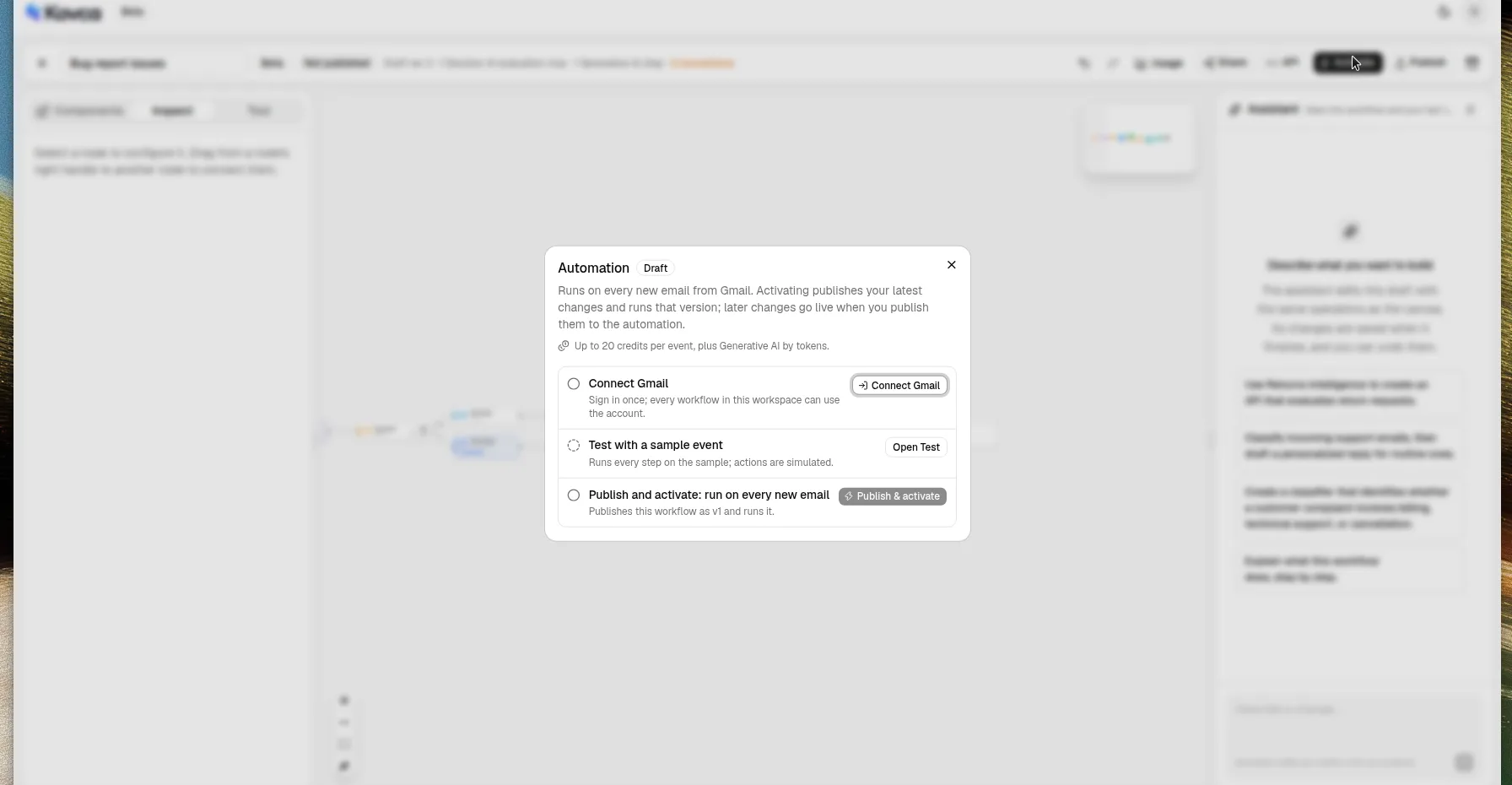 Connect Gmail is still to do. No account is connected.
You sign in on Google's page. The sign-in page names Composio, which holds the account access and uses it only for Gmail. Kovca keeps an ID for the account. Don't connect an account until the routes look right in the Test tab.
New mail that matches the trigger starts a run. Follow runs in Executions. While an automation is paused, events that arrive are skipped. A failed run is not retried on its own, because the reply or the issue may already have happened.
If the inbox is small
You don't need this if a person can read the inbox. Gmail's own filters can label mail that matches a search, and the tracker can stay a form with three boxes: steps, expected, actual. That's a fair setup for a few reports a week.
What the workflow adds is the same classification on every message, a payload shaped like an issue, a reply only when the three fields are absent, and a label on everything else. You still have to replace the placeholder label IDs, point Open issue at a real tracker, choose the Gmail account, and read a sample of results before you activate it.
Make it yours
- Split feature requests from how-to questions. Support Triage will not do that. Add your own check on the
productpath, or another Generative AI step with a field you define, and give each its own label. - Page the owning team. The Team note line is there for Slack Send message (
action:slack/send_message@1). Map Channel per product area if you add a lookup fromproduct_areato a channel ID. - Write the label back only after the issue exists. Add label is available on the bug branch too, if you want the mailbox to show that the report was filed. Use a label ID, as a one-item list.
- Roll it out on a copy of the label. Point Only emails matching or In label at a test label for a week and compare what it files with what the team filed by hand.
- Change it without surprising a live inbox. Edit the draft and use Publish & update. The running version stays pinned until you do.
What it costs
Credits, and only for steps that succeed. Studio tests are free, and simulated actions are free.
- The run: 10 credits when a Gmail event starts it, 1 credit when the API starts it.
- Support Triage: 5 credits.
- Extract report: Generative AI, by tokens, at least 1 credit, and only when the bug branch runs.
- Open issue: 1 credit when the HTTP request runs for real.
- Gmail Reply or Gmail Add label: 2 credits each, when that action runs for real.
- Slack Send message, if you add it: 2 credits when it runs for real.
The switch, conditions, text, and lookup are free. A branch that doesn't run isn't charged. The Activate panel adds every step together, including steps on branches that can't run in the same event, so its number is an upper bound. With this template that upper bound is 20 credits per event, plus Extract report by tokens. The response's credits field is the run's total. See billing, the workflows API, HTTP actions, and automations.